On the Adobe Reader make sure that the SandBox Protection it's Deactivated. To do so please follow these steps:
-
-
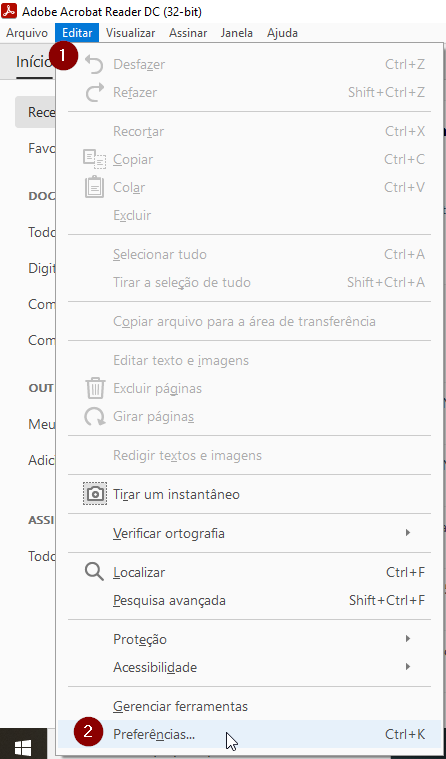
go to Edit
 and then Preferences
-
go to Edit
-
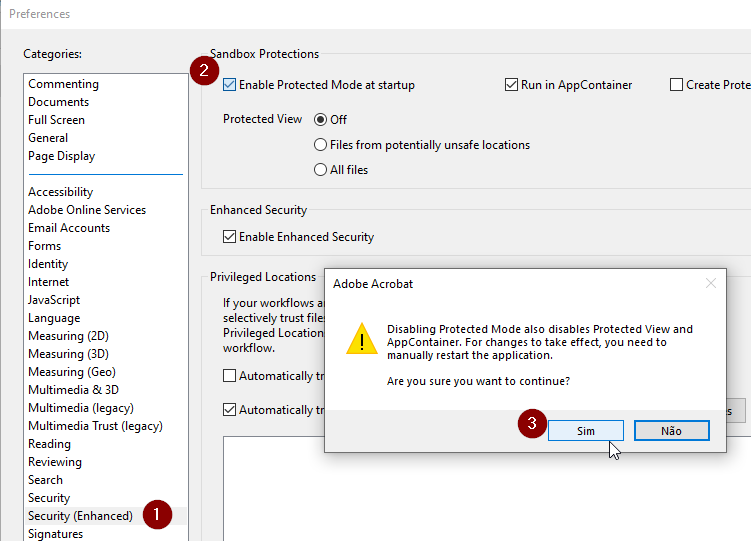
- On the categorie Security (Enhanced)
 in the Sandbox Protections disable Protected Mode at Startup
- On the categorie Security (Enhanced)
-
- A warning window will appear. You'll have to choose Yes (Sim)
 to Change the settings
 - After this operation is concluded please restart the Adobe Reader
- Please try again to digitally sign with the Remote Certificate
- A warning window will appear. You'll have to choose Yes (Sim)